

When Microsoft 365 Goes Down: Is Your Business Continuity Plan Ready?

The November 12 to 13, 2026 Microsoft 365 outage lasted 23 hours 50 minutes, disrupting 14 services including Exchange Online, Teams and Copilot. Microsoft traced it to a latent defect from an earlier network capacity upgrade. This guide covers BCP, DR, RTO/RPO and a 10-question readiness check.
Businesses depend on cloud services to run daily workflows, manage documents, and handle internal and external communications. These platforms support routine business activities and help teams work from different locations.
The Microsoft 365 outage of November 12 and 13, 2026 lasted 23 hours 50 minutes and disrupted 14 services. Outlook, Teams, Copilot, SharePoint, and Exchange Online experienced service issues, affecting email, meetings, and collaboration. Businesses should be prepared to continue essential work when these services are temporarily unavailable.
As services returned, businesses were left with an important question: could they continue essential operations if a critical cloud service became unavailable?
The answer depends on how a business operates and where its critical processes rely on cloud services. Teams should identify alternative ways to complete essential tasks when a key platform is unavailable.
What Happened During the November 2026 Microsoft 365 Outage
Microsoft 365 was disrupted worldwide from 16:20 UTC on November 12, 2026 to 16:10 UTC on November 13: 23 hours 50 minutes by Microsoft’s own incident record. Microsoft declared it fully resolved on November 14 at 04:15 UTC, after clearing the mail backlog.
BleepingComputer reported that many Microsoft servers became unavailable, reducing capacity as customer demand increased. Microsoft worked to rebalance traffic and restore servers, but some infrastructure issues continued to affect service stability.
Microsoft traced the fault to a latent defect introduced during an earlier network capacity upgrade, which surfaced only after a more recent network change. The company ruled out malicious activity, and stated explicitly that the outage was not caused by AI or agents. Microsoft filed the incidents as EX1550543 and MO1550821.
The disruption affected several services, including:
- Outlook: Email and mailbox access were disrupted.
- Microsoft Teams: Communication and collaboration were affected.
- SharePoint Online: Some functions were disrupted, although users could still access files stored directly on the service.
- Microsoft Copilot: Access to AI-powered workplace assistance was disrupted.
Microsoft also named OneDrive, Defender, Purview, Fabric, Intune, Planner, Power Apps, To Do, Power BI and Universal Print. Fourteen services in total, which is the point: the dependency was wider than most teams had mapped.
The Bigger Lesson: Technology Dependency and Business Continuity
Modern businesses use connected platforms to manage customers, internal processes, and documents. If a service becomes unavailable, employees may lose access to the information and tools they need. During this outage, NHS staff in the UK reportedly lost email and Teams for the day, which delayed some services.
This risk is not limited to any one cloud provider. It highlights the need to manage technology concentration and strengthen the resilience of critical systems. Business continuity planning helps organizations identify operational risks and prepare ways to keep essential activities running during disruptions.
6 Things to Prepare Before the Next Cloud Outage
A business continuity strategy should cover short-term disruptions (minutes to hours), medium-term interruptions (hours to days), and long-term recovery (days to months).
1. Write a Business Continuity Plan (BCP) You Have Actually Tested
A Business Continuity Plan (BCP) should identify essential operations, outline alternative ways to perform them, assign employee responsibilities, and define communication and incident-management procedures. Review the plan regularly and ensure employees know how to use it. DSG’s business continuity consulting can help organizations evaluate these requirements and develop practical plans for managing disruptions.
2. Set Disaster Recovery (DR) Priorities Before You Need Them
Disaster Recovery (DR) focuses on restoring IT systems, applications, and infrastructure. Define critical workloads, recovery priorities, and the order in which services should be restored. DSG’s disaster recovery and cloud infrastructure expertise can help businesses plan recovery priorities and improve IT resilience.
3. Keep Backups Your Cloud Provider Does Not Control
Maintain independent backups of critical business information, even when cloud-based backup services are in use. Automate regular copies and store them separately from the original data.
Protect backup copies with appropriate security controls and set clear retention periods. Test restoration regularly to confirm that data can be recovered when needed. These steps help protect important information and support recovery after a disruption.
4. Agree on a Backup Communication Channel Now
Choose backup communication channels for use when email or collaboration tools are unavailable. Keep emergency contact lists and escalation groups up to date so employees can coordinate with colleagues and customers.
5. Define Your RTO and RPO in Hours, Not Adjectives
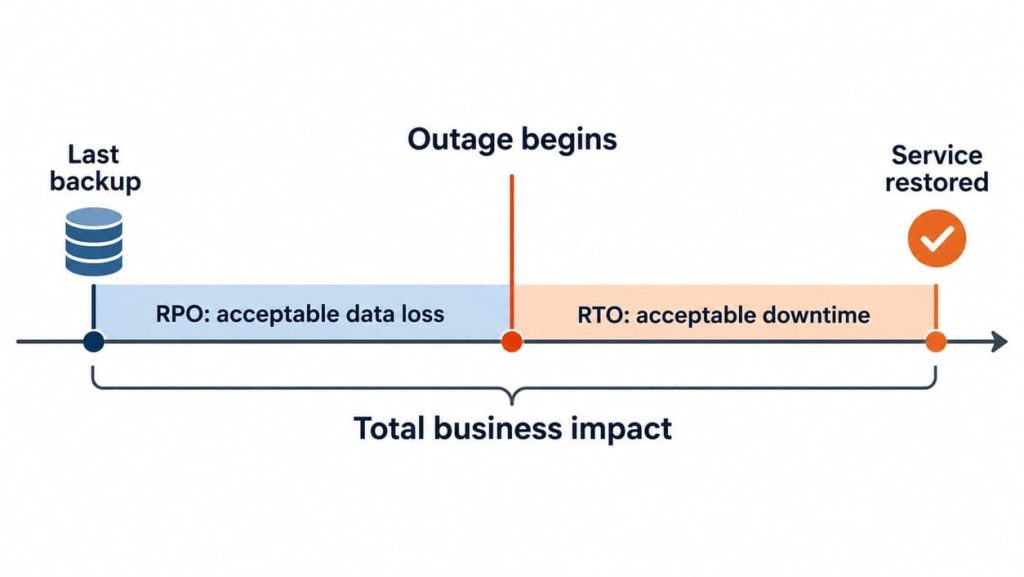
Businesses should define the maximum acceptable time within which each critical process or IT service must be restored after a disruption. This is the Recovery Time Objective (RTO). Businesses should also define the maximum amount of data loss they can tolerate, measured in time. This is the Recovery Point Objective (RPO).
6. Reduce Single-Vendor Concentration With Hybrid or Multi-Cloud
A hybrid cloud combines on-premises infrastructure with cloud services. A multi-cloud approach uses services from more than one cloud provider. Either approach can offer flexibility when aligned with business needs.
The 10-question readiness check
Score one point for each question you can answer with a confident yes. Not “we probably could” or “someone would figure it out”. A confident yes means you have done it, written it down, or tested it.
- Can you name the three business processes that stop first if email goes down?
- Do you know your RTO for each of them, in hours, written down somewhere?
- Could your team reach every employee within one hour without email or Teams?
- Do you hold a backup of your mailboxes and files that your cloud provider does not control?
- Has anyone restored from that backup in the last 90 days?
- Do you know who declares an incident, and who speaks to customers?
- Could your finance team process a payment run with the primary platform offline?
- Do you have a second channel your staff have actually used, not just installed?
- Have you run a tabletop exercise on a cloud outage in the last 12 months?
- Do you know your provider’s mail timeout window, so you know when delayed messages start bouncing?
8 to 10. You are in good shape. Your gap is probably testing frequency rather than planning.
5 to 7. You have a plan on paper. The questions you missed are usually the ones that fail during a real outage, because untested steps do not work under pressure.
0 to 4. You are relying on the outage being short. November’s was 23 hours 50 minutes.
Distributing workloads across suitable environments can reduce reliance on one technology ecosystem. Resilience still depends on effective integration, security, monitoring, and ongoing management. Through its consulting and cloud infrastructure services, DSG Technologies helps businesses modernize IT environments and prepare for service disruptions.
Conclusion: Prepare Before the Next Disruption
The November 2026 Microsoft 365 outage highlighted the value of business continuity planning. Tested recovery procedures, independent backups, and alternative communication channels can help businesses limit downtime and maintain essential operations. DSG Technologies’ consulting and cloud infrastructure services can support organizations as they strengthen their resilience and prepare for disruptions.
Talk to DSG Technologies about a continuity and recovery review. We will walk your critical processes, identify where a single platform failure stops work, and give you a tested plan with real recovery times.
Methodology note
How we sourced this. Outage timings and the root cause come from Microsoft’s own post-incident report for incidents EX1550543 and MO1550821, filed in the Microsoft 365 admin center, cross-checked against contemporaneous reporting. Third-party outage trackers show a shorter window because they measure user reports rather than service health; we have used Microsoft’s figures throughout. The readiness check reflects questions we ask during continuity assessments.

Related Articles


Recently Posted
When Microsoft 365 Goes Down: Is Your Business Continuity Plan Ready?
24 Nov 2026
What Enterprise AI Actually Costs: Pilot, Production and the Gap Between
24 Nov 2026
AI Agents vs RPA vs Traditional Automation: What Fits Which Process?
17 Nov 2026
AI Use Case Discovery: Choosing the First Three Processes to Automate
06 Nov 2026